Odoo 20 was released on 11 September 2026 in Odoo's official repository. As with every release, the weeks that follow bring a flood of feature lists: useful for getting a rough idea, useless for making a decision.
We did something different. We cloned the Odoo 19 and Odoo 20 repositories — Community and Enterprise — and started testing the new functionality hands-on, along with the improvements made to what we already knew.
This article does not list everything. It isolates the things that, if you run an Odoo installation with customisations on top, change the size of your migration quote or the date when it makes sense to do it.
Odoo 20 in short: AI, AI, and more AI.
1. AI stops suggesting and starts doing
AI in Odoo does not begin with version 20: version 19 already had fifteen ai_* modules — the assistant in CRM, in the Knowledge Base, in computed fields, in live chat. They were support tools: they drafted text, summarised a document, replied to a customer.
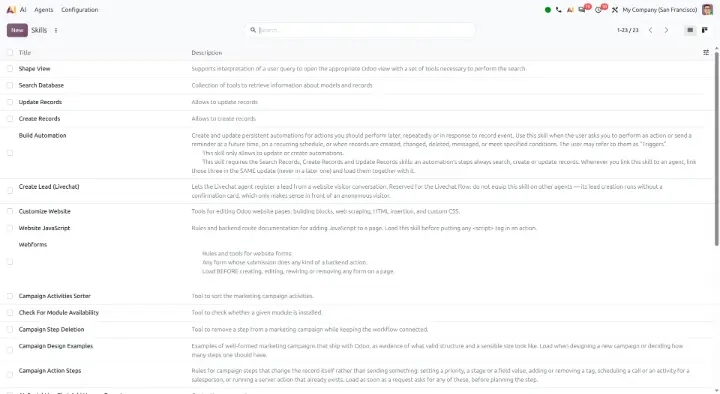
In version 20 the ai_* modules in Enterprise become fifty-one, and the leap is not one of quantity. The key module is called ai_agentic and it introduces two concepts that did not exist before:
ai.skill— a configurable ability made of instructions plus a set of tools- the tools are
ir.actions.serverrecords with theuse_in_aiflag enabled.
Put plainly: an AI agent in Odoo 20 can execute server actions on your database. It does not draft an email for you to approve — it creates the record, changes the state, triggers the workflow. The module depends on base_automation, so agents hook into your existing automations.
Alongside it sits ai_mcp, the module for MCP integration: Odoo exposes an MCP server — the Model Context Protocol, the standard through which AI assistants connect to external systems. The address is your instance URL with the /mcp suffix, authentication uses an API key scoped to MCP, and the module implements a full OAuth server (registered clients, authorization codes, bearer tokens on a protected route). It means an external AI client can query and operate on the ERP through an authenticated, traceable channel.
Then come the vertical bridges, one per application: ai_sale, ai_purchase, ai_stock, ai_project, ai_timesheet_grid, ai_account_reports, ai_helpdesk, ai_product, ai_mass_mailing, the whole ai_marketing_automation family (CRM, SMS, WhatsApp, loyalty, e-commerce), ai_html_builder, ai_calendar, ai_esg.
The caveat worth stating up front. All of these modules are marked iap_paid_service under the OEEL-1 licence: they are Enterprise, pay-per-use, and the reasoning happens on external language models. Before switching on an agent with write permissions on a production ERP, three things need to be decided — which data leaves, with which permissions the agent runs, and who audits what it did (see the notes on data security and privacy in the next section). These are governance questions, not configuration ones, and the answer is not in the manual.
It should also be said that, given the strong demand that has driven the adoption of AI tooling, the integration between Odoo and MCP servers (as well as the agentic side) has already been built independently by implementation partners and customers. For many customers the question would therefore be whether to migrate tools they already run to the native Odoo 20 apps, or to keep using something that is already tested, working, and has absorbed significant investment.
Where your instance's data ends up
This is the question every customer asks the moment AI comes up, and it deserves a precise answer rather than a reassuring one. We went looking for it in the code.
Your instance never talks directly to the AI companies. Every call goes through a single endpoint, https://ai.api.odoo.com, defined in ai/utils/ai_utils.py: this is Odoo's IAP infrastructure, and authentication uses the account token plus the database UUID. You do not need — and cannot set — an OpenAI or Google API key: it is Odoo that forwards the request to the model provider. Contractually your counterparty is Odoo S.A., and the LLM provider is one of its sub-processors.
Which model gets used is no longer your decision in version 20. In Odoo 19 the ai.agent model had an llm_model field for choosing the LLM; in version 20 that field no longer exists and the selection has moved server-side, inside Odoo's proxy. References to Gemini and OpenAI as active providers remain in the code.
What actually leaves. Looking at the parameters of the completion request, what goes out is the conversation, the system prompt with the instructions of the loaded skills, the schemas of the exposed tools — and the tool results, that is, the data read from the database and handed back to the model for the next step. It is not just the user's question that leaves: the records leave. If the agent reads three invoices to answer, those three invoices end up in the next prompt. There is no form of anonymisation or masking whatsoever: the data goes out as it is.
What Odoo does to protect it. The safeguards exist, they are in the code, and they all act upstream — they limit what the AI is able to read:
- a blocklist of models never exposed to the AI (
base.automation,res.device,res.groups,res.groups.privilege,res.users.settings, plus the internalai.*models): the agent cannot read the security configuration itself - the agent inherits the permissions of whoever uses it, and no more: tools check access with
check_accessandhas_accessbefore reading, and the execution of server actions performs an explicit de-escalation to the real user's rights. An agent does not see what the user would not see - human confirmation before acting: every call to a tool that writes stops and asks for confirmation, with automatic approval disabled by default, and a cap on the number of consecutive calls that stops an agent from looping.
The two points that deserve attention. The first concerns MCP: when the request comes from an external client, human confirmation is taken as granted and the tool runs. Tools exposed over MCP carry a dedicated flag, distinct from the one used by internal agents, so the surface can be narrowed — but whoever holds the token acts with that user's full rights, with nobody in between. That token should be treated like a password, not like a read-only key.
The second is subtler: the surface of data that can leave coincides with the permission set of the user running the agent. If that user can read every invoice, then potentially every invoice can leave. The real control is not a checkbox in the settings, it is the design of groups and record rules — which in most installations has never been re-read with this question in mind.
One last aspect is not in the code, because it is not technical: data retention, use for training, residency and the list of sub-processors are contractual matters, and they live in Odoo's data processing agreement. For GDPR purposes the customer remains the controller, Odoo is the processor and the model provider is a sub-processor. For a customer handling health data, judicial data or information under confidentiality constraints, that document is the first thing to read — before the module is even installed.
We look at costs, the limits of the system and open alternatives in a dedicated article: Odoo 20's AI: powerful, closed and Enterprise-only.
2. Paper Muncher: the end of the wkhtmltopdf era (finally)
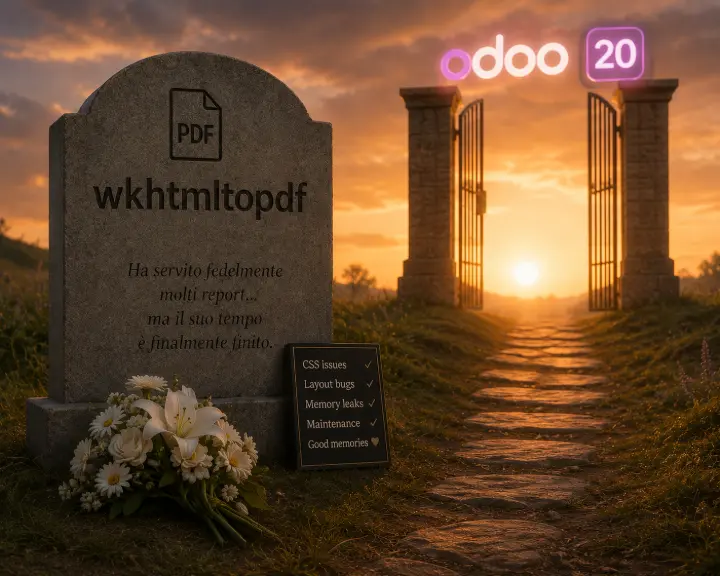
Anyone who has worked on Odoo PDF reports knows wkhtmltopdf: the external binary, the patched build to install by hand, the margins that behave oddly, the modern CSS that fails to render because the engine underneath is a WebKit frozen ten years ago.
Odoo 20 introduces Paper Muncher, an HTML-to-PDF rendering engine written in-house by Odoo. It lives in the base_report_paper_muncher module and adds a new report type, qweb-pdf-paper-muncher, alongside the existing ones. It handles headers and footers natively and reads paperformat parameters (DPI, margins) directly.
wkhtmltopdf does not disappear: it has been split out into the base_report_wkhtmltox module, installed automatically. The two paths coexist.
What it means in practice. If you have custom reports — and if you are an Italian company with delivery notes, accompanying invoices or layouts agreed with your accountant, you do — the move to the new engine has to be tested document by document. A different rendering engine renders CSS differently: this is exactly the kind of work that cannot be estimated by eye and belongs in the quote. The good news is that you can migrate one report at a time, because the report type is a field on the individual ir.actions.report.
3. ir.access: one model for permissions and rules
This is the change that touches every existing custom module, without exception.
Odoo has always written security in two places: ir.model.access (the ir.model.access.csv file, with its four columns perm_read, perm_write, perm_create, perm_unlink) and ir.rule (record rules, in XML, with domains). Two models, two syntaxes, two places to look when a user sees something they should not.
Odoo 20 merges them into a single model, ir.access, and a single security/ir.access.csv file. The format changes like this:
# Odoo 19 — ir.model.access.csv
id,name,model_id:id,group_id:id,perm_read,perm_write,perm_create,perm_unlink
access_account_account_salesman,...,account.model_account_account,sales_team.group_sale_salesman,1,0,0,0

# Odoo 20 — ir.access.csv
id,name,model_id,group_id/id,operation,domain
access_account_account_salesman,...,account.account,sales_team.group_sale_salesman,r,
Permissions become a CRUD string (r, cru, crud…), the domain is a column on the same row, and every rule is classified as either permission or restriction. The domain also gains a new operator — ('move_id', 'access', 'read') — which lets access to one record depend on access to another, something that previously required code.
The result, once you are on the other side, is cleaner: a model's security reads in one place. Getting there, however, goes through every security file of every custom module.
Odoo provides an automatic conversion script — 19.4-00-ir-access.py, run through the odoo upgrade_code command — which rewrites the CSVs and the record rule XML. It works well on standard cases. It does not work on rules built in Python at runtime, which have to be reviewed by hand.
The server: higher minimum requirements
A detail you discover late and that costs half a day, so better to say it first. The minimum requirements declared in odoo/release.py change:
| Odoo 19 | Odoo 20 | |
|---|---|---|
| Python | 3.10 | 3.12 |
| PostgreSQL | 13 | 16 |
Some Python dependencies change too: PyPDF2 is replaced by pypdf, pytz and xlwt disappear from the declared dependencies, h11 comes in.
The practical consequence is that a machine running Ubuntu 22.04 — Python 3.10, PostgreSQL 14 from the system repositories — is no longer enough. You need Ubuntu 24.04 or Debian 13, and if the database sits on a server managed by someone else, the PostgreSQL jump has to be agreed and planned beforehand, not during the migration.
What breaks in custom code
Beyond ir.access, the 20.0 branch brings a series of changes that touch custom code. The most relevant ones:
- OWL 3. The frontend framework moves to version 3:
t-refbecomes a signals system, props are read withuseProps,onWillUpdatePropsis replaced,static defaultPropsare forbidden by the compatibility layer. Every bespoke JavaScript component needs reviewing. Odoo ships a migration script (owl3-migration.py) that handles the mechanical part. registry.clear_cachebecomestransaction.invalidate_ormcache._rec_names_searchmust be a tuple, not a list.- In XML,
type="base64"becomestype="bytes"for attached files. t-callin QWeb templates changes handling and has its own conversion script.
It should be said that Odoo has done a good job on the tooling: the odoo/upgrade_code/ directory contains conversion scripts for almost all of these changes, and they run with a single command. The time they give back is real. The time they do not give back is testing: no script tells you whether, after conversion, your order approval flow still works the way it did.
Modules that change address
Some reshuffles are worth checking, because they touch functionality you may have switched on:
- Field Service has been rewritten.
industry_fsm*andhelpdesk_fsm*are gone; in their place comes a family of fourteenplanning_field_service_*modules, built on Planning instead of Project. If you use on-site interventions, this is not an upgrade: it is a fresh implementation of the module. - The IoT Box becomes Obox.
iot_box_imagedisappears, theobox_*family arrives (with Android versions for POS and Quality) along with a baseprintermodule. If you have fiscal printers, scales or payment terminals connected through an IoT Box, check hardware compatibility before scheduling the migration. - Wishlist and product comparison move inside
website_sale: the separatewebsite_sale_wishlistandwebsite_sale_comparisonmodules no longer exist. base_vat,base_ibanandl10n_latam_baseare absorbed into the core, as isstock_picking_batch. Fewer modules to install, but also dependencies to fix in the manifests of custom modules that referenced them.- Alternative purchases are split out of
purchase_requisitionintopurchase_alternativeand its bridges.
Functional news worth knowing about
With no claim to completeness, the new Community modules with a direct commercial impact:
| Module | What it does |
|---|---|
mysubscription | self-service portal where customers manage their own subscriptions |
portal_discuss | Discuss opened to portal users: direct chat with customers and suppliers |
crm_sale_project | converts an opportunity straight into a project |
sale_project_margin | project margin overview |
fleet_maintenance | links Maintenance equipment to fleet vehicles |
pos_stock, pos_sale_stock | stock availability inside the point of sale |
mail_tracking | email tracking becomes a module separate from the mail core |
website_partnership | partner management on the website |
populate | synthetic data generation for testing |
Inventory also gains a reordering rule suggestion wizard, and the POS picks up a long list of new payment and hardware integrations (Bancontact Pay, Mollie, Cashdro, Cashmatic, iMin printers, QRIS).
On the performance front, the diff contains 228 [PERF] commits concentrated mainly on accounting (new indexes on account.move, faster amount computations, better memory handling in batch payments) and on the notification bus.
For Italy: the localisation consolidates
Anyone working with Italian electronic invoicing will find l10n_it_edi in better shape. The diff holds around sixty commits on the Italian localisation, almost all of them fixes for cases that waste time in production:
- correct import of multiple invoices contained in a single XML
- handling of pension funds, including several funds on the same line and those with a zero rate
- split payment: corrected data and closing logic
- flat-rate scheme: simplified invoices (TD07) can be used without restrictions
- OSS brought in line with the FatturaPA specification
- correct assignment of the TD01 document type on import
- VF25 fixed in the annual VAT return
- fiscal position applied to the taxes of imported vendor bills
- RA Agenti withholding on a 20% taxable base.
The functional addition is CodiceCommessaConvenzione on electronic invoices, the field required for supplies to the Public Administration tied to a contract or framework agreement.
None of these is a brochure feature. They are all things that, if you have run into them, you know the cost of.
When not to migrate right now
The honest answer is that, as with every new Odoo release, for most companies migrating to Odoo 20 is not something to do this quarter (and probably not in the first quarter of 2027 either).
Hold off if you have many custom modules with OWL components and bespoke PDF reports: between OWL 3, Paper Muncher and ir.access the adaptation work is real, and the first weeks of a major release are when you meet the bugs that will fix themselves in two months.
Hold off if your POS or IoT hardware is connected through an IoT Box and you have not yet checked what happens with Obox.
Hold off if you are on Odoo 18 and none of the version 20 news solves a problem you have today. One more version does not create value on its own.
Seriously consider moving if you are on Odoo 17 or earlier: with version 20 out, 17 leaves the window of versions supported by Odoo, and staying on a version that is no longer maintained is a decision to take deliberately, not by inertia. Move as well if operational AI unblocks a concrete bottleneck in your processes, or if you are already on PostgreSQL 16 and Python 3.12 and your set of customisations is contained: in that case the window of work is short.
Before renewing or migrating, check your licences too. Odoo 20 brings Light Users, and employee records without a login are now counted as well: we explain it in Odoo 20 Light Users: what they are and why the bill can grow.
How we approach a migration
Our method for these transitions is always the same, and it is not complicated: first you map what is actually there — custom modules, reports, integrations, connected hardware — then you migrate on a copy, then you test with the customer's real data, and only at the end do you touch production. The part that takes experience is not running the upgrade script: it is knowing in advance which of your customisations will break, and what it costs to put them back together.
If you are weighing the move to Odoo 20 and want to understand what it means in your specific case, let's talk: an analysis of your existing customisations tells you within hours whether it makes sense to move now or in six months.
Odoo 20, a technical overview: what actually changes if you are on Odoo 17 or 18